
Run your whole business from your phone.
Take orders from a QR code, a link or at the counter, and keep the day's money, stock, team and numbers in one app. Customers order from their own phone, with nothing to install.
- No extra hardware
- Set it up yourself in one sitting
- No commission
- Café or restaurant
- Bakery or home kitchen
- Salon or service
- Shop or home brand
- Something else
Every kind of business
Orders, pre-orders, bookings or deliveries. In your words.
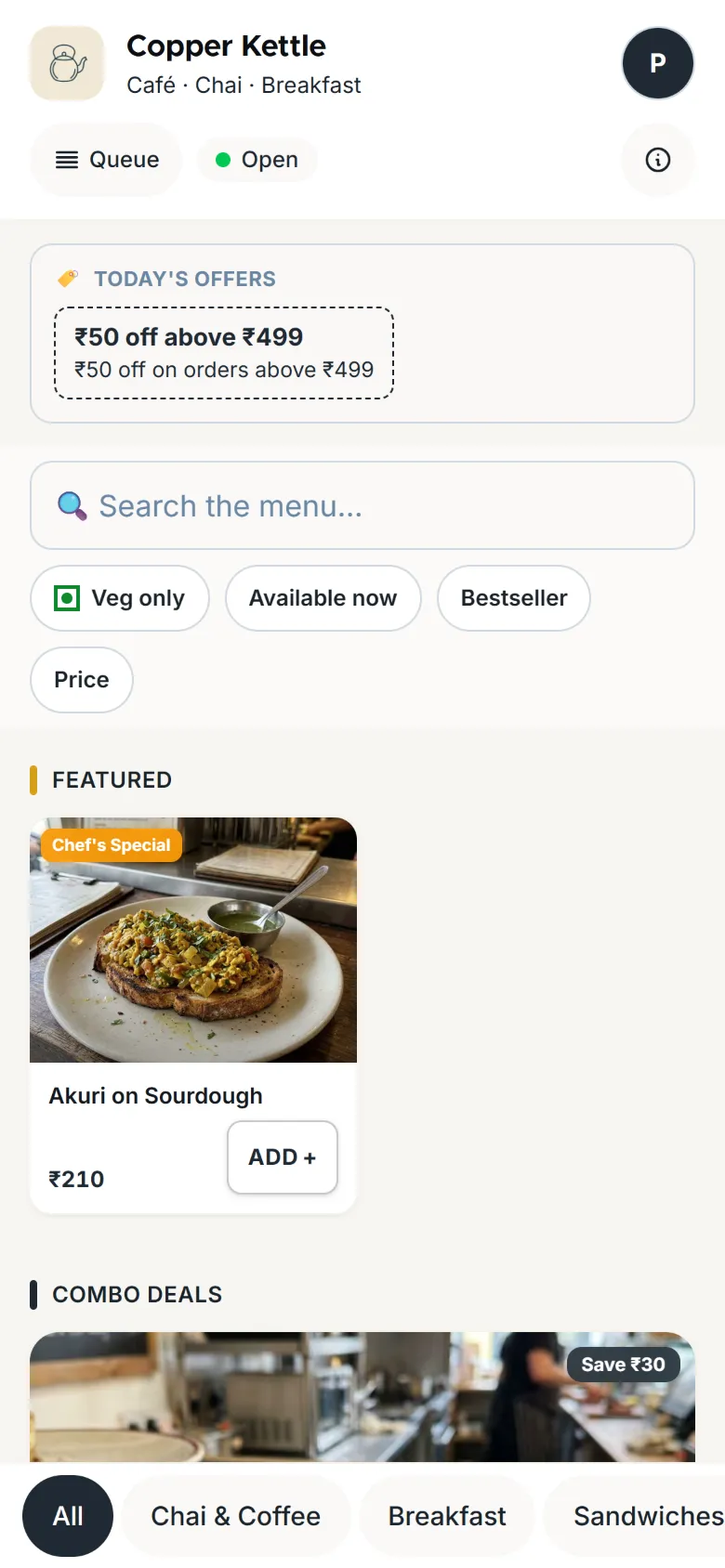
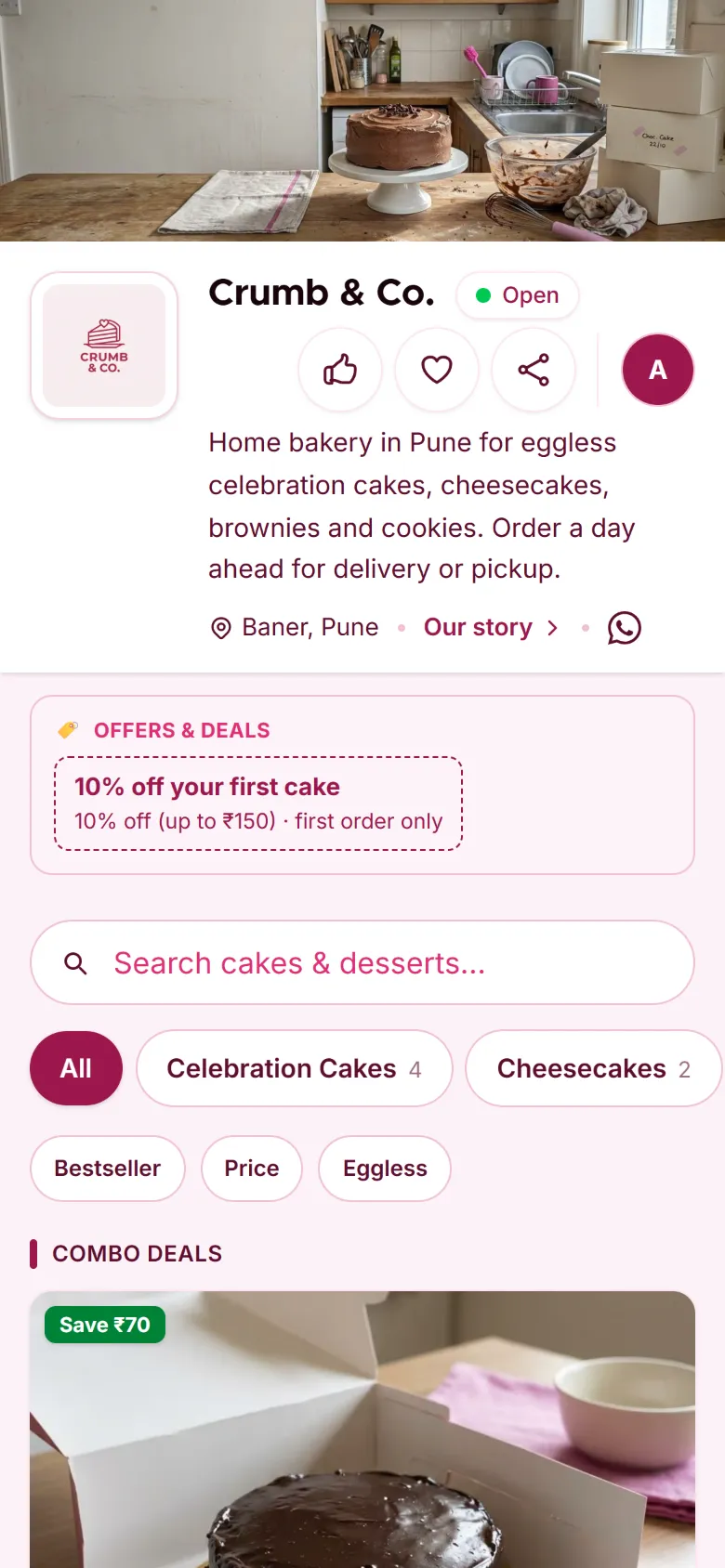
KioSnap works the way your business does: a café takes orders, a bakery takes pre-orders, a salon takes bookings and a shop delivers.
Orders from the table QR or the counter, straight to the kitchen screen.
How it works for you
Makers and everything else: Handmade, gifting, craft and anything else you sell: a catalog, quotes on request and orders.
- Placed
- Confirmed
- Preparing
- Ready
- Served
Orders from the table QR or the counter, straight to the kitchen screen.
How it works for youMakers and everything else: Handmade, gifting, craft and anything else you sell: a catalog, quotes on request and orders.
Follow one order
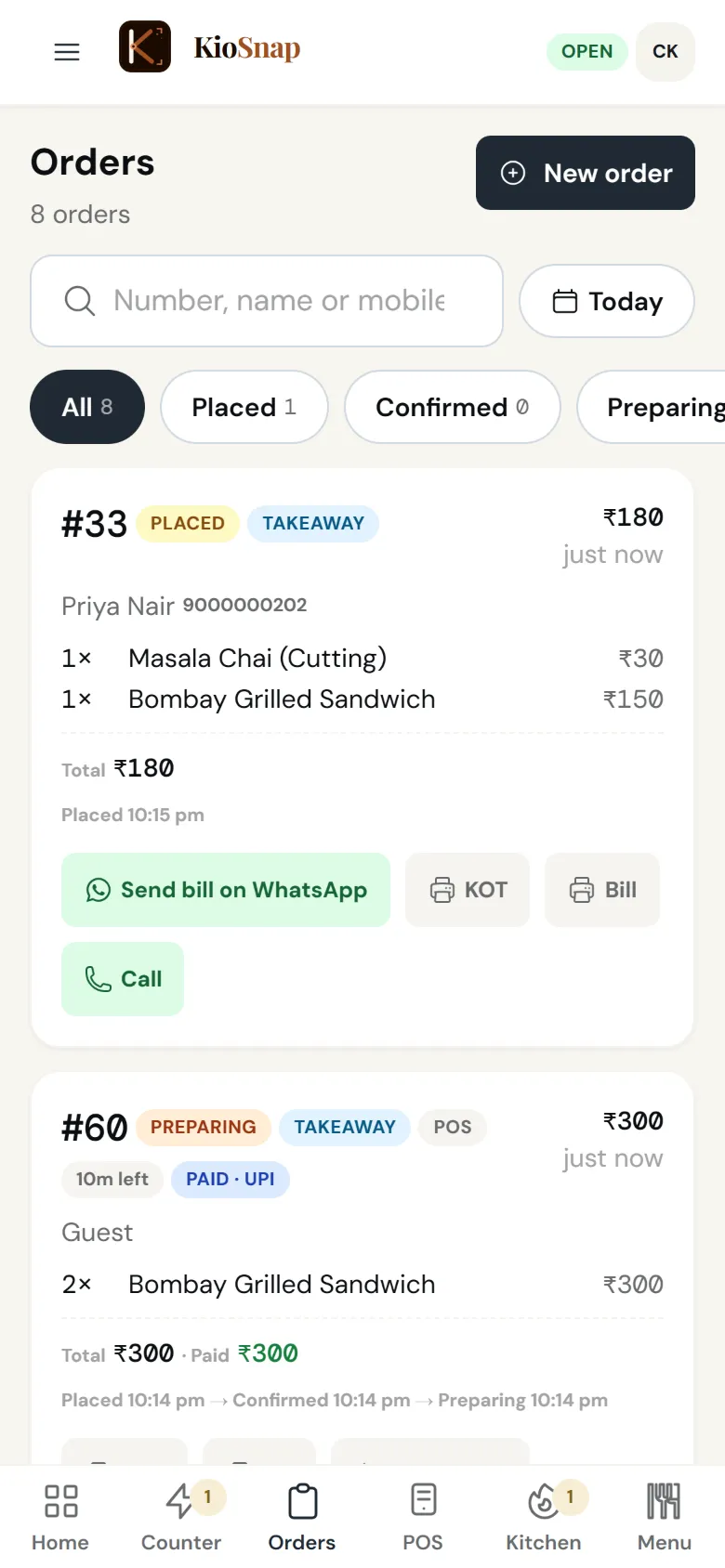
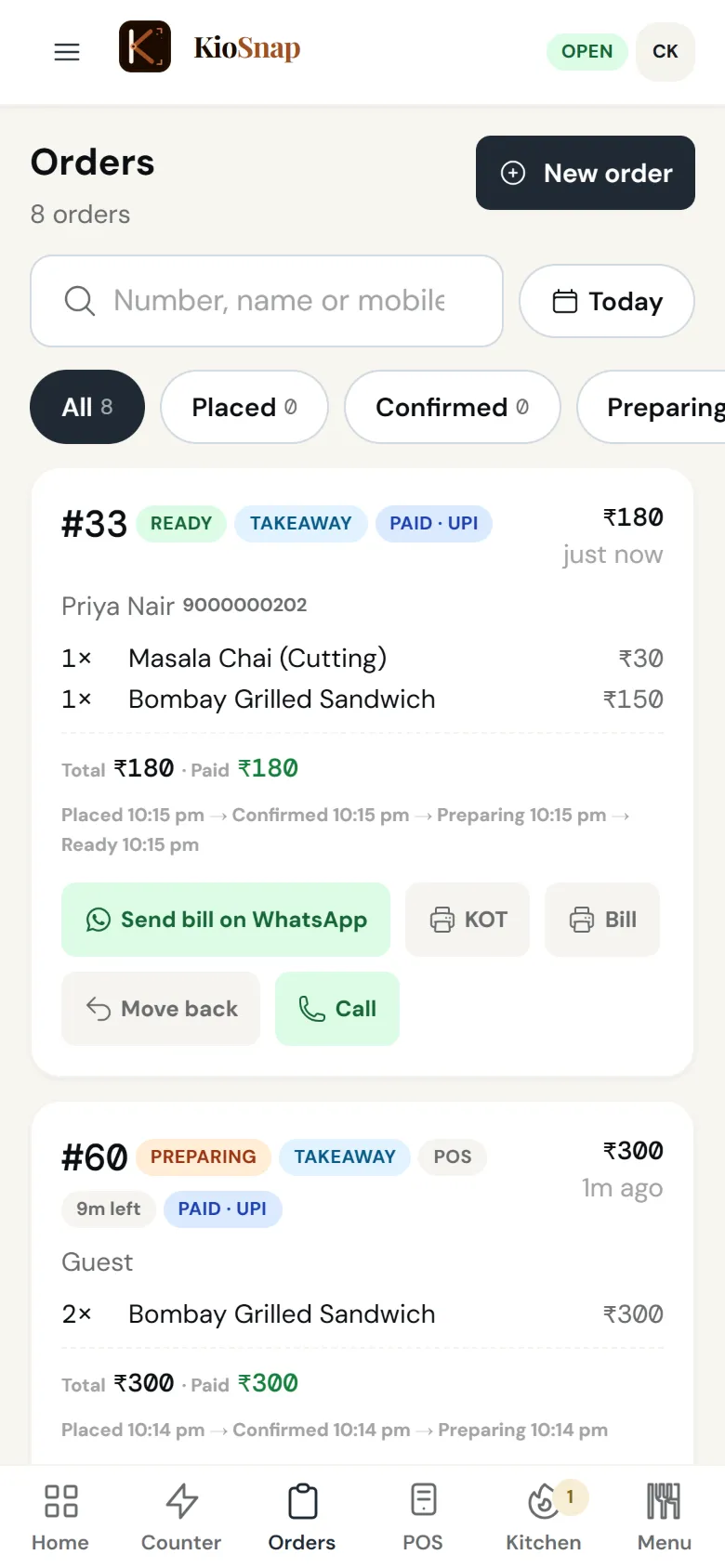
Order #33 at a café, on both phones.
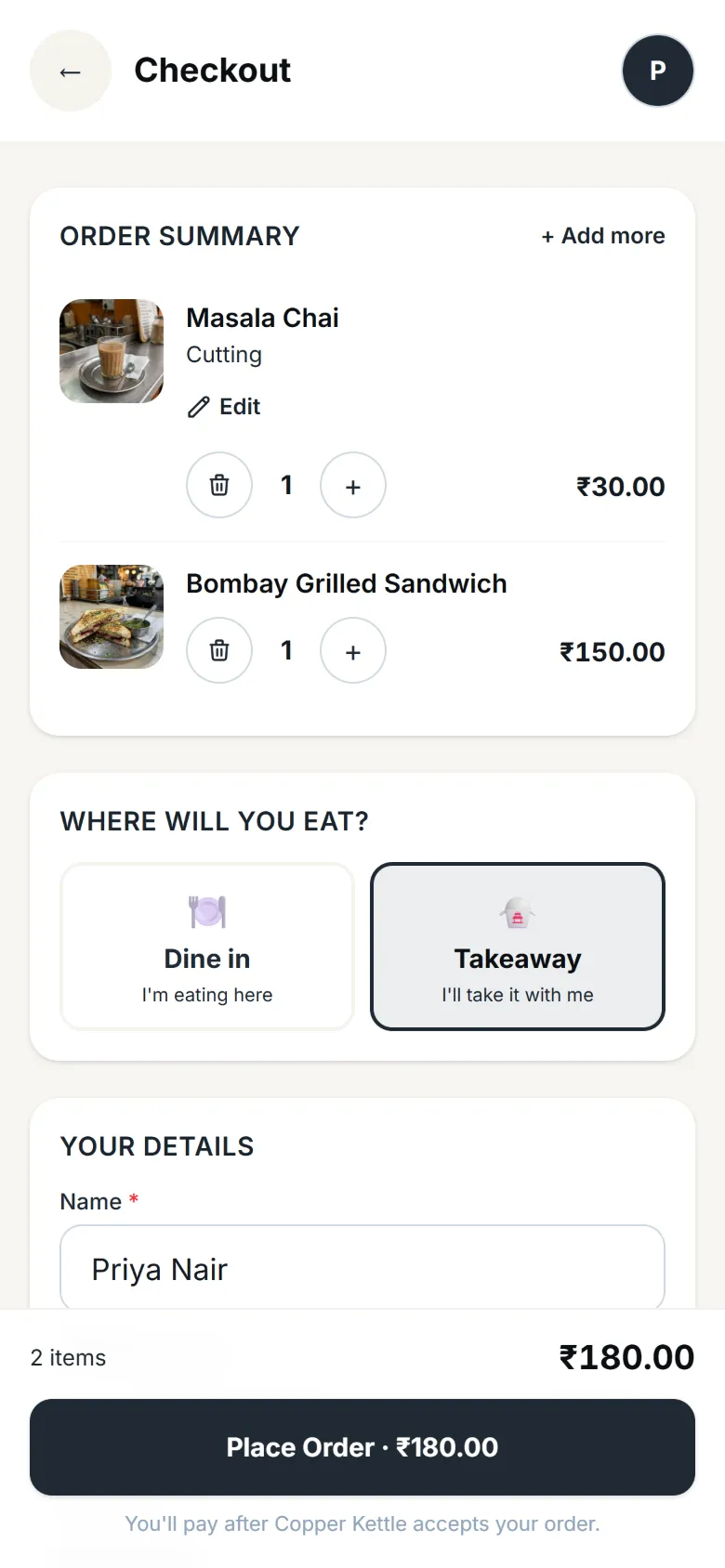
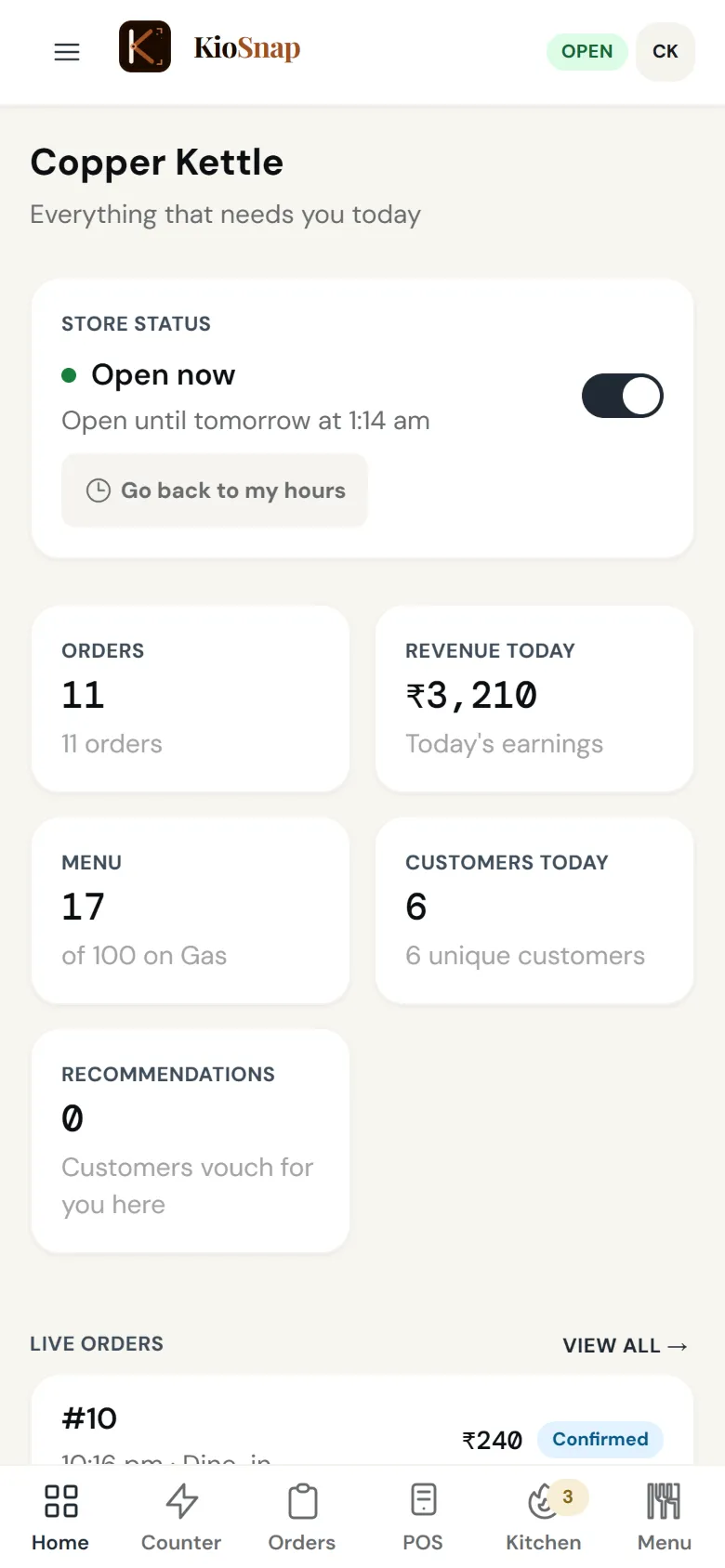
Every screen here is real: a customer orders a chai and a sandwich, and the café runs it to the counter.
Real screens, captured 7 Oct 2026 from a KioSnap demo café
- Customer
Opens your menu
Priya scans the QR on the counter. Your menu opens in her phone's browser, with photos, prices and today's offer. Nothing to install.
- Customer
Orders in two taps
A cutting chai and a Bombay grilled sandwich. Her name and number are already filled in from her last visit.
- You
Your phone rings
Order #33 lands on your phone and keeps ringing until someone answers. Priya is told to pay at the counter.
Taking orders: Charcoal and up - You
Paid, accepted, in the queue
She pays by UPI to your own QR and you accept. Her phone shows her place in the queue and roughly when it will be ready.
- You
The kitchen makes it
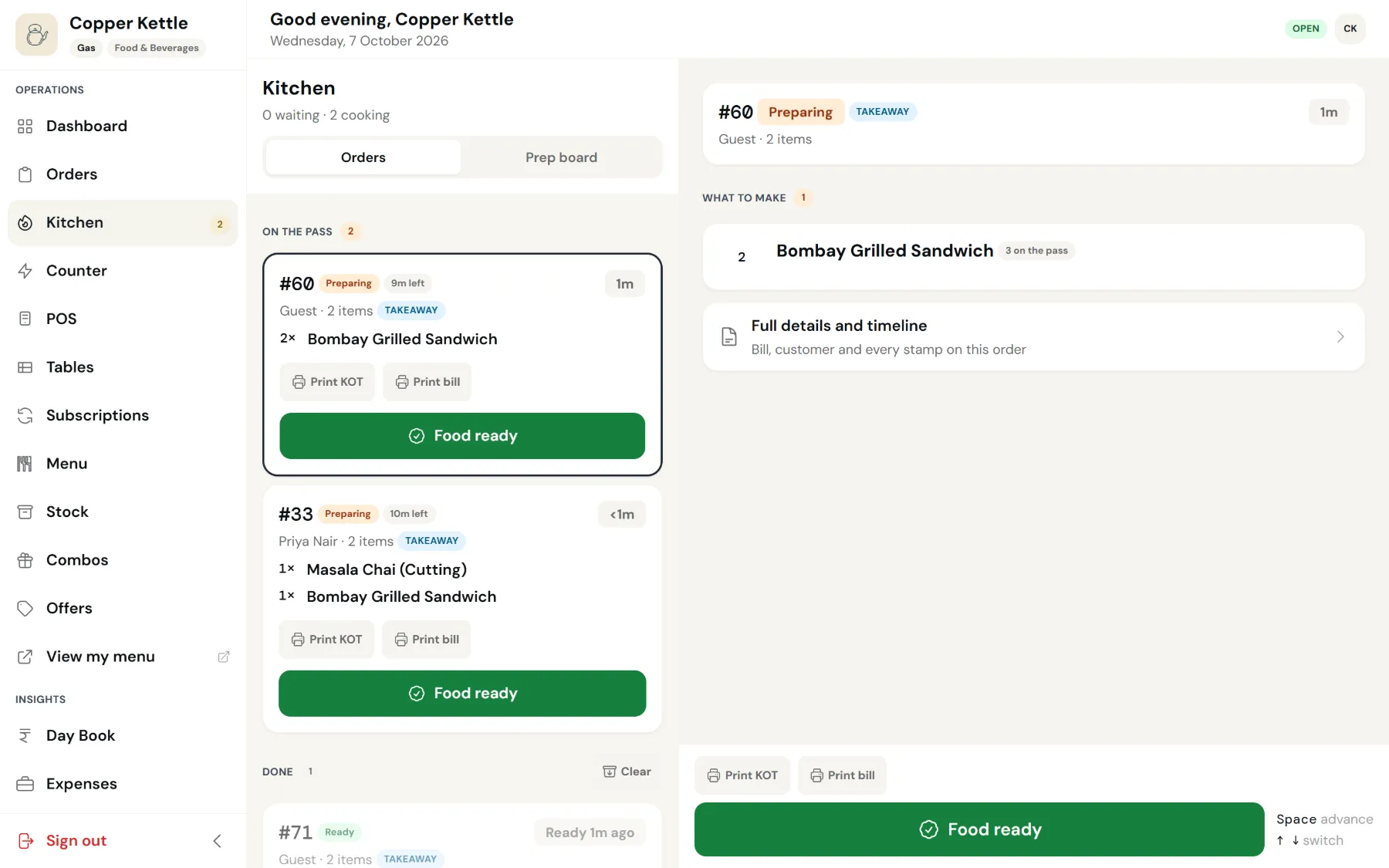
The kitchen screen lists what to make. One tap on Food ready when it is done.
Kitchen screen: Charcoal and up · food - Customer
Ready, without shouting a number
Her phone turns green: pick it up at the counter. Then it asks her to rate the order, so your reviews come from real orders.
- Happens on its own
Already in your books
The sale is in the day book as UPI. Cash in the drawer, expenses and the day's close are on the same screen.
Day book: Charcoal and up · food
Not only QR orders
Your whole business, on the phone in your pocket.
Bill walk-ins, close the day, watch stock and waste, raise every bill, know your regulars and run your team. Every order you log feeds the reports.
- Charcoal and up · food
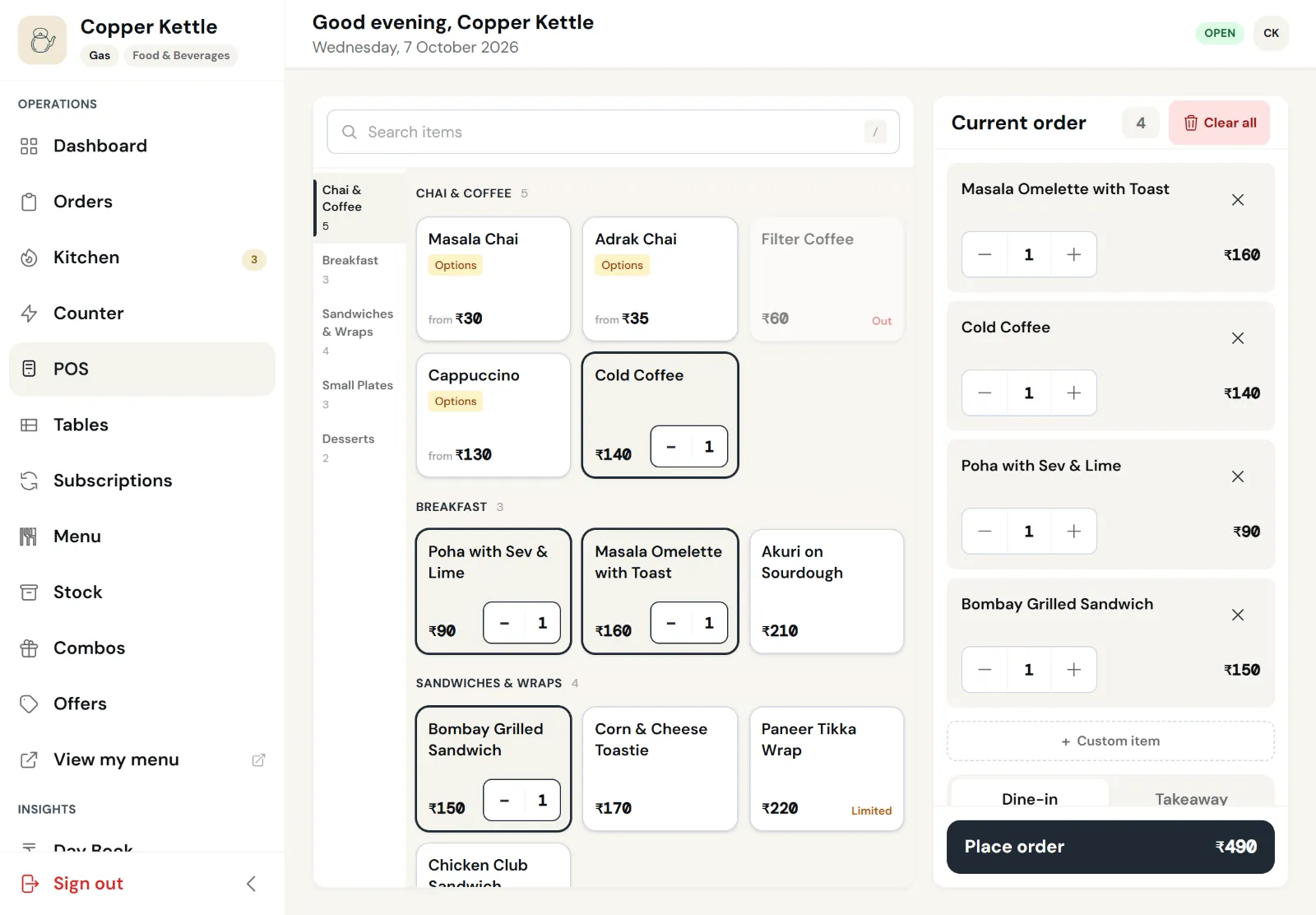
Bill at the counter
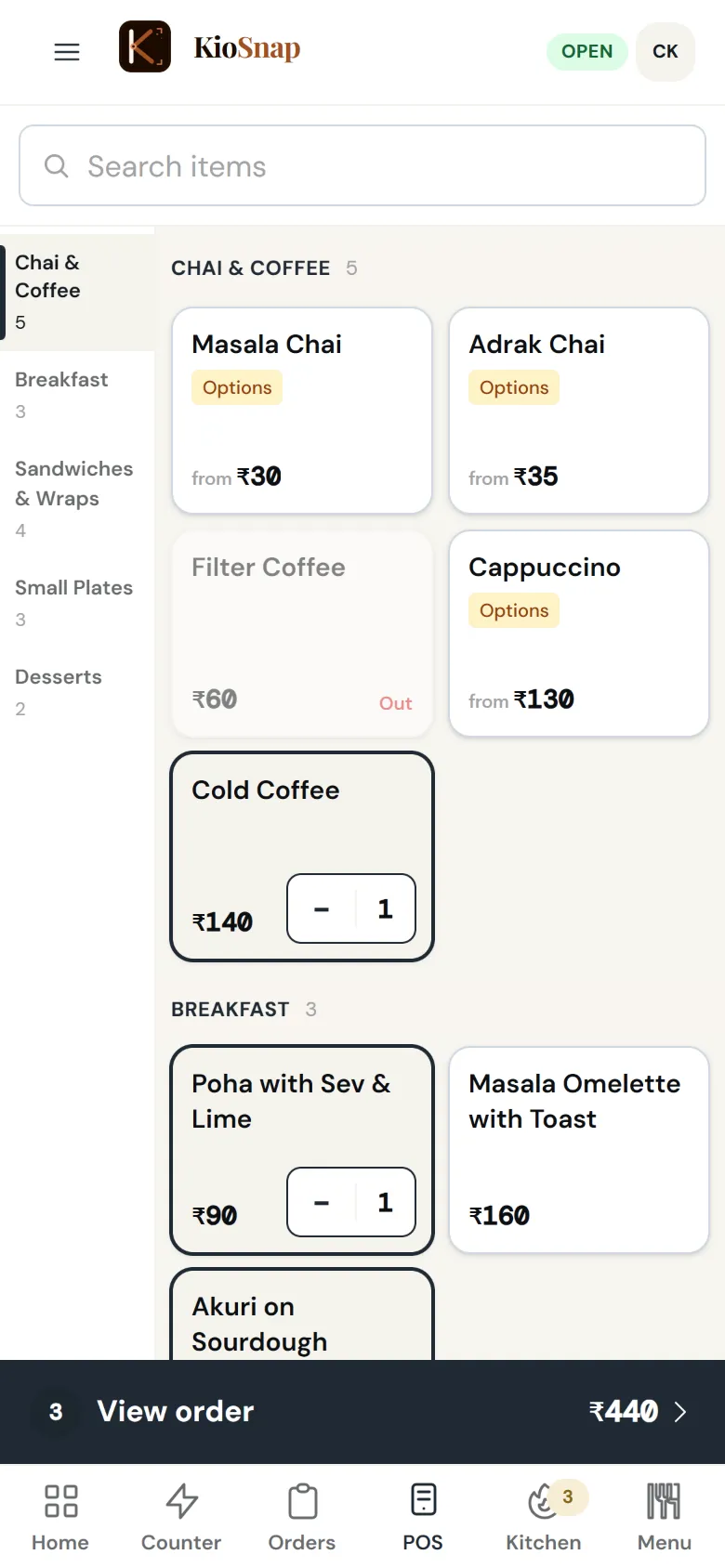
Tap items, take cash or UPI, done. Items that ran out grey out on the POS by themselves.
Real screen · POS, a walk-in bill in progress
- Charcoal and up · food
Run the kitchen
Every accepted order shows on the kitchen screen with what to make and how long it has waited.
Real screen · Kitchen, two orders on the pass
- Charcoal and up · food
Close the day
Cash, UPI and expenses add up as you sell. Count the drawer and close the day in one tap.
Real screen · Day book, today
- Charcoal and up
Know your numbers
Revenue, expenses, profit, average order value and customers, for 7, 30 or 90 days.
Real screen · Analytics, last 7 days
- Every plan
Stock that counts itself
See what is out and what is running low. Each sale comes off the count.
Real screen · Stock, items counted
- Every plan
See what you throw away
Waste in units and rupees, by week or month, so you make less of what goes unsold.
Real screen · Waste, this week
- Charcoal and up
Raise every bill
Combos and offers that nudge a bigger order. Watch your average order value move.
Real screen · Combos, two live
- Charcoal and up
Know your regulars
Repeat rate, who owes you, and every customer's orders and spend.
Real screen · Customers, repeat rate
- Charcoal and up
Run your team
Staff log in with their own PIN and see only their job. Every sale shows who made it.
Real screen · Team, manager and cashier
No special hardware
Your phone is enough. A bigger screen helps.
The same login works on any phone, tablet or computer you already own. Add a screen when the rush needs one.
Phone
Everything, wherever you are. A new order rings until someone answers it.
Tablet at the counter
A bigger screen for faster billing when the queue is long.
Screen in the kitchen
Tickets the whole kitchen can read, with one tap for Food ready. For food businesses.
On Android? The KioSnap Vendor app rings on a locked screen and keeps billing without internet.

Instead of a demo call
Set it up yourself, in one sitting.
Four steps from sign-up to your first order. If you get stuck, WhatsApp us and a person replies.
- 1
Sign up with your mobile
A number and a code. About a minute.
- 2
Add your items
Type them in, or photograph your printed menu or price list and check what the AI read (paid plans and the 14-day trial).
- 3
Put out your QR
Print it for the counter or the tables. Share your link on WhatsApp and Instagram.
- 4
Take your first order
It rings on your phone. You can also log a walk-in order yourself.
Taking orders: Charcoal and up
Send us your menu. We build your storefront today.
WhatsApp a photo of your menu, price list or catalog and your shop name. We set it up, send you the link and the QR, and walk you through it in your language.
Free. A real person replies, usually the same day.
Real shops, real orders
Already selling on KioSnap.
Every store here is live right now. Tap one to see exactly what your customers would see.
 KC Fast Food ZoneCafe · Viramgam96 items
 KhaanpaanCafe · Ambli Road, Ahmedabad62 items
 Pahadi KitchenRestaurant · Bopal Road, Ahmedabad53 items
 The Cake Corner By KashishCake Studio · Nana Chiloda, Ahmedabad46 items
 RIVA GRUH UDHYOGPackaged Foods · Ghatlodia, Ahmedabad34 itemsOpen now
 Aarambh KitchenRestaurant · Gota, Ahmedabad33 items
 KioSnap KettleCafe · Ahmedabad26 items
 Freezing LamhePhotography · Maninagar, Ahmedabad25 items
 Jalaram Clean & FreshRetail Shop · Ahmedabad18 items
 Jalaram enterprisesHome cleaning · Navalgadh, Dhrangadhra12 items
- QQube StudioConsulting · Ahmedabad12 itemsOpen now
 WE-3 Car Care ProductsOnline Store · Sarkhej, Ahmedabad12 items
 Herbsin LeafBeauty & Skincare · Jodhpur, Ahmedabad11 items
 Glint & GlowRetail Shop · Ahmedabad8 items
 Jai Girnari Gaushala TrustPackaged Foods · Rakanpur, Ahmedabad3 itemsOpen now
- AAditya KiradRestaurant · Nathupur2 items
 ZOFED FOODSReady to cook food product manufacturer · Bhopal1 items
Browse by city
Browse by category
Plans
Start free. Pay when you take orders.
Wood
₹0
A catalog and a QR code, display only
- 3 items
- Storefront and QR
- Stock counts and waste
Charcoal
₹299/month
Your first online orders: food stalls, bakers, home brands, services
- 50 items, 5 combos
- Orders and customers
- 2 staff
Gas
₹599/month
Cafés and restaurants with dine-in tables, or a bigger catalog
- 100 items, 10 combos
- Tables and recipes
- 3 staff
Solar
₹999/month
High-volume businesses that want no limits
- Unlimited items, Unlimited combos
- Everything in Gas
- 5 staff
KioSnap Private
Your own software, built on KioSnap.
For a larger business: your workflows, reports, integrations, branches and brand. It runs on your own servers, set up and maintained by the KioSnap team under a signed NDA.
- Servers
- Yours
- Brand
- Yours
- Workflows
- Built to fit
- Branches
- Several
- Maintenance
- KioSnap team
- Price
- Quoted per business
FAQ
Quick answers before you start
What is KioSnap?
KioSnap is an app for running your business from your phone. Customers order from your storefront by scanning a QR code or opening your link, with no app to install. You get the orders, your customers, your team, stock and waste, expenses and your numbers in one place, and food businesses also get the POS, the kitchen screen, tables and the day book. It is built in India for businesses of every size.
Is KioSnap free to start?
Yes. The Wood plan is ₹0: a storefront with a QR code and up to 3 items. Taking orders starts on Charcoal at ₹299 a month, and every paid plan starts with a 14-day free trial. There is no commission on any plan.
Do I need special hardware or an app?
No. KioSnap runs on the phone, tablet or computer you already own, and customers order from their own phone's browser. The free KioSnap Vendor app for Android adds an order alarm that rings on a locked screen and billing that keeps working without internet. You never need it to sell.
What kinds of businesses can use KioSnap?
Food stalls, cafés, restaurants and cloud kitchens; bakeries and home kitchens; salons and other services; shops and home brands; makers and anything else sold locally. Each gets its own words and flow: food runs a live order queue with a kitchen screen, products run accepted, dispatched and delivered, and services run bookings.
Is KioSnap for a single stall or a big restaurant?
Both. KioSnap is for businesses of every size, from one counter to a busy restaurant with a full team, and the plans go up to unlimited items, combos and offers. A larger business that wants its own system can have KioSnap Private, built for it and run on its own servers.
How long does it take to go live?
Most owners set it up in one sitting: sign up with your mobile, add your items and print your QR. On paid plans and the trial you can photograph a printed menu and the AI drafts your items for you to check. Or WhatsApp us your menu and we set it up for you.
How do my customers pay?
They pay you directly: cash, or UPI to your own QR, and you mark the order paid. KioSnap never holds your money and takes no cut.
More questions? Read the full FAQ →
Your first order can come in today.
Sign up, add your items, put out your QR. Or WhatsApp us your menu and we set it up with you.